Example 1
On the left, you can find SDL Passolo with two parts: the area where the translator adds the target string and the WYSIWYG area.


During this session, we were introduced to software localisation (graphic user interface or GUI, help system, documentation, screenshots, audio), with a focus on GUI, which includes menus, dialogue boxes, error messages, progress bars, buttons and licenses. Error messages are difficult to deal with because it is necessary to recreate them and sometimes it is not straightforward.
In my opinion, the most important idea to bear in mind is that there are different localisation strategies depending on two aspects: if the code is compiled and if the translatable text is isolated or embedded in the rest of the code.
If the programme is uncompiled and the translatable text is isolated, we can use CAT tools. We won’t damage the source code, but we won’t have access to the context. This is the best case scenario. On the contrary, if the translatable text is embedded, we need to use filters to extract it and we risk damaging the code.
If the programme is compiled, there are localisation tools (SDL Passolo, Alchemy Catalyst, Lingobit Localiser and Sisulizer). For the lab, we used SDL Passolo. I like that it offers a WYSIWYG preview because it is really helpful for understanding what we are translating. I am grateful that we have the chance of trying so many programmes at the University of Geneva.
SDL Passolo also allows to test if there are overlaps or space issues. Indeed, testing is necessary to check that everything works. And, finally, we should always open the final product.
Software translation is pretty standardised, so we can check, for example, the Microsoft terminology database and style guides. We should always be consistent with previous translations or company style.
During the lecture, we also talked about hot keys, which are activated when we press “alt” and help us to navigate through menus. We can specify hot keys with “&”, “_” and “~”. Additionally, we were introduced to localisation of variables because it can be difficult to identify them and respect spaces before and after them. They are usually represented with “%s”, “%d”, “$n”, “{ }”. This raises the problem of using syntax characters in text. We have to escape them using a backslash or duplicating the characters. I think I would have liked to focus more on variables rather than hot keys because I think that variables are very common.
During the lab, I had to translate a version of Paint, the programme that Windows offers to draw. I localised a menu from French into English as well as a dialogue box, where I resized some elements. Finally, I added hot keys. I faced many constraints with them: I couldn’t use characters with descenders or use the same letter at the same level. That is why I had to change hot keys many times. I also had to take care of shortcuts, but I don’t think that the ones we had were a good example because they were the same in English and French. This exercise also made me realise that I should pay attention to date, currency, measurements and number formats. I checked many times to make sure I didn’t repeat anything. I also tried to be consistent with existing Paint terminology.
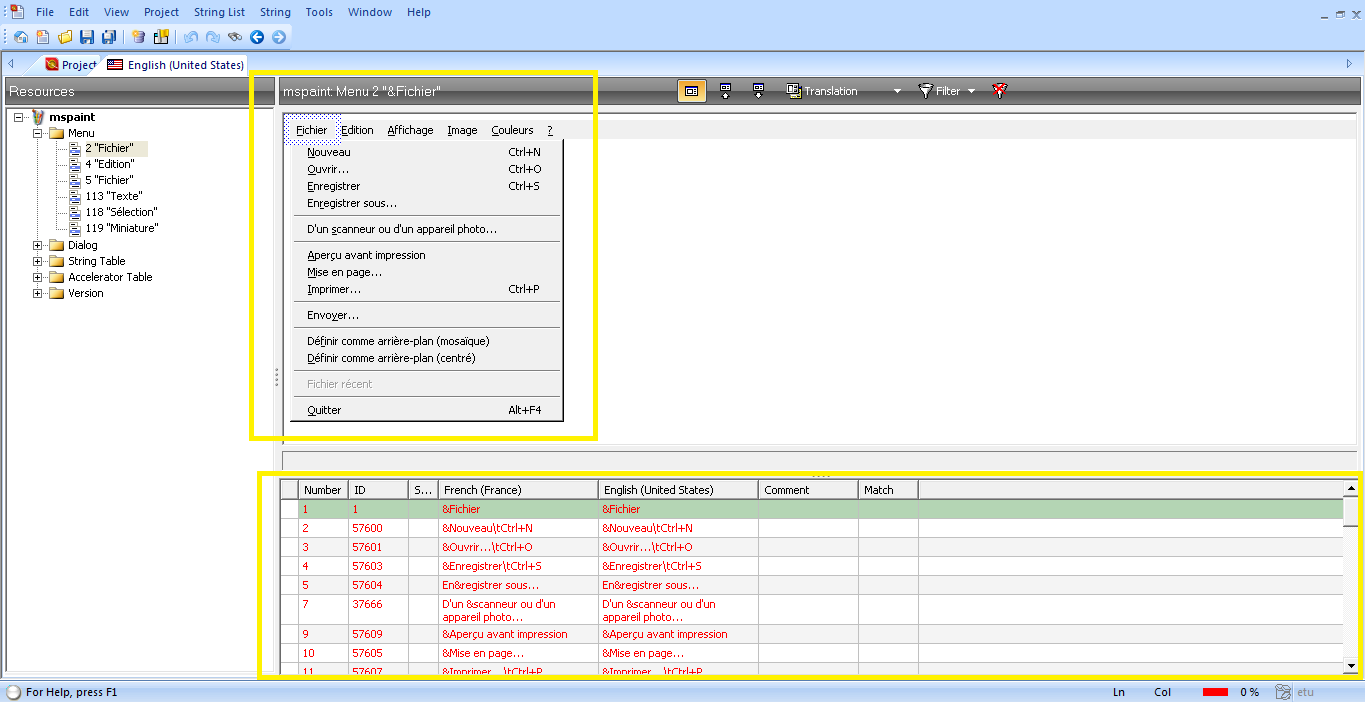
On the left, you can find SDL Passolo with two parts: the area where the translator adds the target string and the WYSIWYG area.
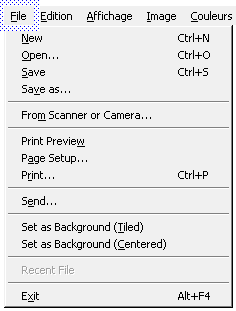
This is the resulting English translation of the Fichier menu.
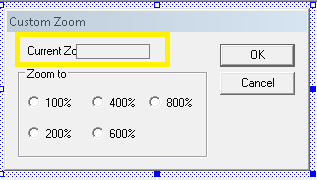
On this dialogue box, there is a layout problem: we cannot see the text.
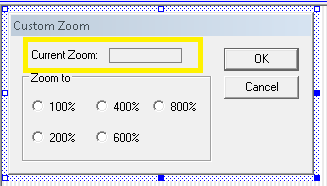
After moving the elements, everything is visible now.
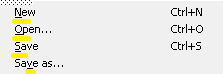
On this screenshot, you can see how I added hot keys in every line.